
How to Find GMDN Codes for Free

Has EUDAMED been delayed until 2023?
January 24, 2022
Transfer your UK Responsible Person (UKRP): Steps and Timing
February 18, 2022Page Last Reviewed: 15 August 2023
- Option 1: GMDN Agency ‘Basic’ Account
- Option 2: Australian TGA Public Database
- Option 3: USA FDA Global UDI Database
- Frequently Asked Questions:
- What is a GMDN code and why do I need one?
- Are FDA GMDN codes the same as the GMDN Agency’s codes?
- Are GMDN codes the same as European EMDN codes?
- Where can I download a free Excel list of all GMDN codes?
- What if I cannot find a suitable GMDN code for my device?
- How can I see which GMDN codes my competitors used?
Option 1: GMDN Agency ‘Basic’ Account
The GMDN Basic account is easy to create and is free.
STEPS
- Go to the GMDN website: https://www.gmdnagency.org/
- Click on “Register” on the home page. A credit card is not needed if you select the basic membership option.
- After your account is created, go to the Top Bar, and click “Terms”, then “Search”.
- Enter key words about the device to populate options.
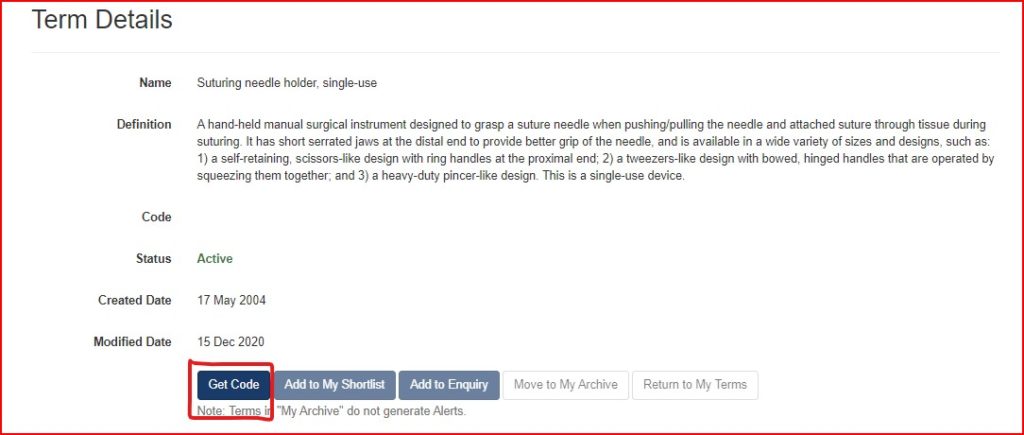
- If you find a GMDN term and description that fits, click the red Get Code button. This will then show you the five-digit GMDN code. We recommend taking a screenshot of both the Term Name & Definition Page and the GMDN code, for future reference.
PROs: It is fully free to search.
The basic membership only provides 20 code credits; however, you can ‘buy’ sets of 50 additional credits for free. This is a positive change for industry, considering that several years ago a membership fee was required to obtain more than five code credits.
This is the most accurate resource for up-to-date GMDN codes.
CONs: The site will not be as user-friendly under the basic free membership. For example, you will not be prioritized if you need to use their Enquiry Service, which helps manufacturers if they are unable to locate the correct GMDN code. Nor will you be notified if a code you have identified is changed in the future.
Further, unlike the two options below, you cannot easily compare which codes your competitors are using for the same type of device.
Option 2: Australian TGA Public Database
The Australian Therapeutic Goods Administration (TGA) requires GMDN codes to register medical devices and IVDs.
Further, the GMDN code and term is included in the device information posted on the TGA’s public database, called the ‘Australian Register of Therapeutic Goods’ (ARTG). Therefore, you can search the public ARTG to find GMDN codes.
STEPS
- Go to the ARTG Listing Database: https://www.ebs.tga.gov.au/
- Search by product name. E.g., “needle”, “cement”
- Usually Trade Names and Models are not listed in the registration application. Manufacturers often choose to not include it because if the trade name changes or models are updated, then the registration must be updated as well.
- Search by manufacturer name
- Note that registration for non-Australian manufacturers will show up under the name of the Australian Sponsor, not the legal manufacturer. However, if you open the registration details, you will then find the legal manufacturer’s name & address listed.
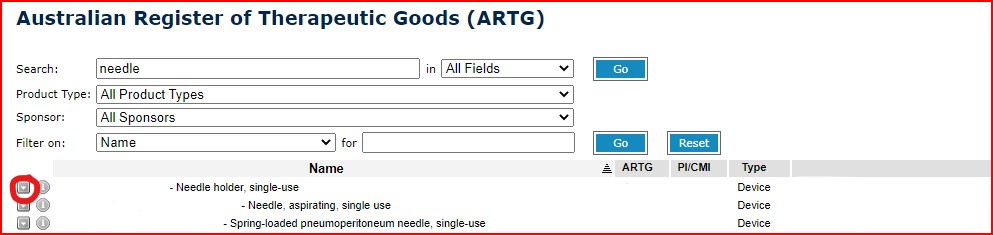
- Click on the down arrow next to the company name. Then select “Public ARTG Summary”
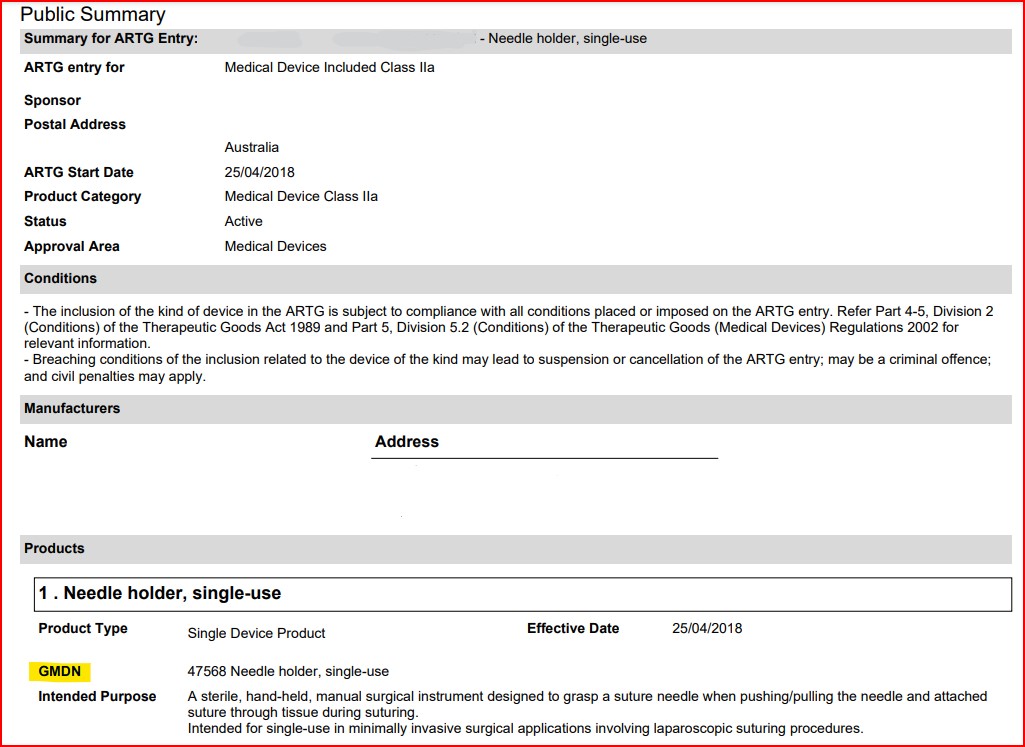
- Once the PDF opens, you will find the legal manufacturer name and the GMDN information
- We have included sample images on how to search and open listings. Note that:
- The intended purpose is entered by the Australian Sponsor/Manufacturer and it may not exactly match the GMDN code description, unless the registrant decided to enter the GMDN description as the intended purpose. If the registrant used their own unique intended purpose statement, then it should align closely with the GMDN code description in order to be accepted by the TGA. It also allows you to see what your competitors have included as the device intended use, if of interest.
- Even though this is public information, we have removed the manufacturer name, address and registration (“ARTG”) number from the images.
- We have included sample images on how to search and open listings. Note that:
PROs: It is fully free to search.
You can see which GMDN code your competitors used, and the intended purpose they entered into the registration application. This is helpful in situations where you are not sure which GMDN code is correct for your device and would like a consensus based on what other manufacturers have selected.
CONs: The TGA does not always update their GMDN database. It is fully based on the GMDN Agency’s data, but it is not interlinked for live updates. For example, if a new GMDN code has been generated, you can ask the TGA to add this new code into their database for use in a registration. However, if a GMDN code was updated or obsoleted, which does happen occasionally, the TGA will not necessarily update its own GMDN database to align with that change. Part of the reason they do not automatically update their records is that it would impact every active registration using that GMDN code, making the code, which was correct at the time of registration, potentially no longer correct.
Therefore, while the public ARTG site is useful to find GMDN codes, and see what your competitors have selected, the best practice is to then compare it against the GMDN Agency’s current database.
Option 3: USA FDA Global UDI Database
The FDA’s Global Unique Device Identification Database (GUDID) is public and lists GMDN terms and definitions for each device.
STEPS
- Go to the GUDID website: https://accessgudid.nlm.nih.gov/
- Enter the device generic name, trade name or manufacturer name into the search bar
- You will then see a list of all options, which you can further filter on the left sidebar
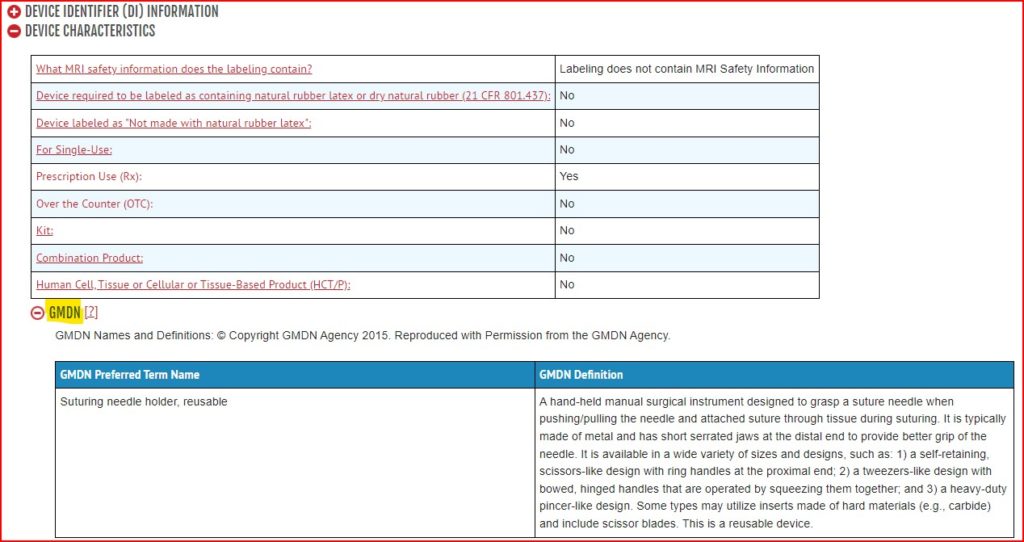
- Click on the device you want to view, then click the red plus button next to “Device Characteristics”, then click the red plus button next to “GMDN”
PROs: It is fully free to search.
You can see which GMDN terms your competitors used. This is helpful in situations where you are not sure which GMDN code is correct for your device and would like a consensus based on what other manufacturers have selected.
CONs: The 5-digit GMDN code itself, is not included. Only the GMDN Term and Definition. However, often the 5-digit numeric code itself is not needed for registration purposes. For example, if you have located the GMDN Term, then that is sufficient to enter in the registration for the UK MHRA registration. The 5-digit code will then automatically populate in the MHRA’s application based on the Term entered. Further, you can enter the Term you found on GUDID into the GMDN agency database and obtain the 5-digit code, if needed.
Frequently Asked Questions:
What is a GMDN code and why do I need one?
A Global Medical Device Nomenclature (GMDN) code is a way for industry to easily group and identify similar types of products.
Why does this matter?
The World Health Organization states “there are an estimated 2 million different kinds of medical devices on the world market, categorized into more than 7000 generic devices groups.”
Consider the volume of medical device registrations submitted, renewed and modified globally each day. As well, consider the number of incidents reported, field safety corrective actions (including recalls) initiated each day. This volume makes it critical for international regulators and hospitals to better categorize medical devices.
For example, let us say a manufacturer with a device under GMDN code “12345” initiates a recall due to safety concerns, and the reason is due to a specific material or supplier. The GMDN code allows regulators to easily identify other devices marketing under that code and assess if similar concerns may need to be addressed with those manufacturers.
Not all regulators use GMDN codes for this purpose. For example, the European Commission developed European Medical Device Nomenclature (EMDN) codes and Japan’s Ministry of Health Labor and Welfare (MHLW) uses Japan Medical Device Nomenclature (JMDN) codes. But the result is the same – a mechanism built to better catalogue and track devices on the market.
Examples of regulators that do require GMDN codes are: the Australian Therapeutic Goods Administration (TGA), UK Medicines and Healthcare products Regulatory Agency (MHRA) and the U.S. Food and Drug Administration (FDA).
The GMDN is made up of the 5-digit numeric Code, Term Name & Description.
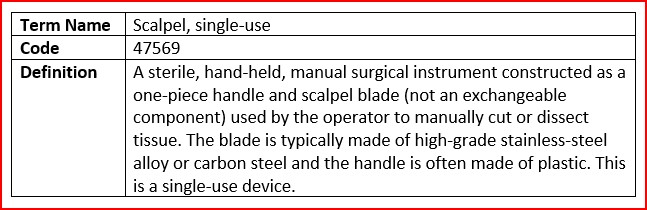
GMDN codes are managed by the GMDN Agency, a not-for-profit organization based in the United Kingdom.
You can read more about global nomenclature here: GMDN, EMDN AND CND: What is the difference?
Are FDA GMDN codes the same as the GMDN Agency’s codes?
Yes. In fact, the FDA’s guidance document specifically states manufacturers should obtain a GMDN Agency membership, to gain access to GMDN terms for use in Global Unique Device Identification Database (GUDID) registration:
“To obtain access to the GMDN vocabulary and to select GMDN terms for submission to the GUDID, companies should first become a member of the GMDN Agency. Visit http://www.gmdnagency.com for details.”
Further the FDA’s guidance document states that it is the manufacturer’s responsibility to ensure that the GMDN term remains applicable to the device. This note is important because GMDN codes/terms/descriptions are sometimes updated and/or obsoleted by the GMDN Agency.
Are GMDN codes the same as European EMDN codes?
No, GMDN and EMDN codes are not the same. The EU Commission developed the European Medical Device Nomenclature (EMDN) system to be used in EUDAMED and it is a completely different coding system.
For more information, including how to find EMDN codes, please visit our page: GMDN, EMDN and CND: What is the difference?
Where can I download a free Excel list of all GMDN codes?
There is no good way for an individual to download a full list of GMDN codes. This is unlike EMDN codes, which can be downloaded as a full Excel file. For GMDN codes, your best solution is to use one of the above databases, and search for GMDN codes per device group you manufacture.
That said, below are how it can be done, when it can be done.
GMDN Agency: Only National Governments, Healthcare Providers and Conformity Assessment Bodies may download a complete file of all codes. Other users, such as manufacturers and consulting firms, must search from the GMDN Agency’s website only.
US FDA GUDID: Technically it is possible to download all the contents in the USA FDA’s Global Unique Device Identification Database. However, it is not user friendly. Aside from the fact that it is 1) an extremely large file and 2) downloads in XML format and must be converted into excel, it is not easy to search through. Further, it will not list the GMDN code, only the device group’s term and definition.
What if I cannot find a suitable GMDN code for my device?
If you are not able to locate a suitable GMDN code for your device, then you can submit a New Enquiry to the GMDN Agency. Note that you must create an account with the GMDN Agency in order to submit a request for a new code. However, you can create a free account for this purpose.
The Agency will request the product description, including the intended purpose. They will then review the product against available codes and decide if:
- There is an existing code that fits the product
- If a GMDN term/description should be modified
- If a new GMDN code should be created
This process can take several weeks, as the GMDN Agency makes a careful analysis prior to modifying or generating new codes.
Note that ‘basic’ (i.e., free account) member requests will have lower priority over paid membership users.
How can I see which GMDN codes my competitors used?
You can find your competitor’s GMDN codes using the Australian TGA’s website (Option 2 above) and the FDA’s GUDID database (Option 3 above). Please read through the ‘Cons’ section to see the precautions around doing this.
The UK MHRA’s PARD registration database is also a good resource to check your competitor’s GMDN codes. You can search by device keywords, the 5-digit GMDN code, or your competitor’s name. Then, the list of registered devices will appear.
However, the caveats to using the UK’s public registration database are:
- You cannot verify the GMDN description through PARD. Only the GMDN code and term/name appear, along with the manufacturer’s name. That said, you can clearly see which 5-digit code they have applied to their device.
- Like the Australian TGA database, GMDN codes may get outdated in the UK MHRA’s database. i.e., the GMDN code used to submit the original registration, may not match the GMDN Agency’s current or best fitting code for the device, due to the original code description having been revised or new, more applicable codes, having been added.